STARFM
Preconditions¤
Parameters¤
input_dir_h¤
Defines the directory containing all high resolution GeoTIFF files.
input_dir_l¤
Defines the directory containing all low-resolution GeoTIFF files. These files were originally lower resolution but have been upscaled to match the spatial resolution of the high-resolution input data.
output_dir¤
Defines the output directory where all fused files will be saved. The file naming follows the convention specified in the preconditions.
band_dict¤
The preconditions require a band specifier in the name of each inputfile. The band dictionary parameter defines the relationship between the bands of high and low resolution data.
Examples:
# high res, low res
# left sentinel, right landsat
band_dict = {
    "2": "2",
    "3": "3",
    "4": "4",
}
uncertainty_h¤
Defines the minimum difference in reflectance required for STARFM to treat two pixel values as meaningfully different. As the uncertainty value increases, the influence of small variations (noise) decreases. Differences smaller than this threshold are considered equal, helping to suppress noise in the fusion process.
This parameter is used for the high resolution data.
uncertainty_l¤
Defines the minimum difference in reflectance required for STARFM to treat two pixel values as meaningfully different. As the uncertainty value increases, the influence of small variations (noise) decreases. Differences smaller than this threshold are considered equal, helping to suppress noise in the fusion process.
This parameter is used for the low resolution data.
ln_weight¤
The parameter controls whether the spectral and temporal distances used in the fusion algorithm are transformed using the natural logarithm. When set to True, the algorithm applies a logarithmic transformation to these distances, which reduces the influence of large differences and makes the weighting less sensitive to outliers. This can help to smooth the fusion result, especially in heterogeneous regions or when there are abrupt changes in reflectance values. When set to False, the distances are used as-is (linear weighting), making the algorithm more sensitive to large differences.
window_size¤
The algorithm uses a moving window to find spectrally and temporally similar pixels to estimate unknown pixel values. The window_size parameter defines the size of this window and must be an odd number. A larger window size increases the chance of finding similar pixels, potentially improving results in heterogeneous areas—but it may also introduce more noise or reduce spatial detail.
The default value is 31.
batch_size¤
This parameter only controls the efficient use of GPU memory. It is directly connected to the execution time and does not affect the quality of the fusion.
The higher the value, the more GPU memory is used and the faster is the execution. Setting this value too high will result in a out-of-memory exception.
The default value is 100.
number_class¤
The parameter controls how strictly the algorithm groups similar pixels within each window. A higher value means only pixels that are very similar to each other are grouped, which can help reduce noise but may exclude useful information in more varied areas. A lower value allows more pixels to be grouped together, making the result smoother but possibly including less similar pixels.
The default value is 4.
A¤
The parameter controls how much the distance between pixels (spatial distance) affects the fusion. A smaller value makes the algorithm focus more on nearby pixels, which is useful in areas with a lot of variation. A larger value reduces the influence of distance, allowing more distant pixels to contribute more to the result.
The default value is 1.
filter_method¤
The filter method defines which relationships between the input images are used for fusion.
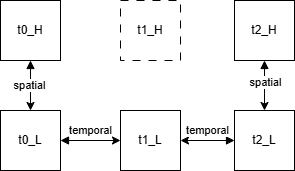
The available options are:
- SPATIAL
- TEMPORAL
- SPATIAL_OR_TEMPORAL
- SPATIAL_AND_TEMPORAL (default)